Image to AI Converter
Convert your images instantly using our free online Image to AI Converter tool
Every designer knows the sudden panic of receiving a tiny, blurry JPEG image from a client and being told to print it on a massive outdoor billboard. If you try to stretch that small image, it instantly breaks apart into a pixelated, fuzzy mess. That is exactly where our online tool at fxroy.com steps in to save your workday. By using our Image to AI Converter, you can transform flat, restricted pixel images into fully scalable files that look incredibly crisp at any size.
Understanding the world of digital file conversion can feel overwhelming when you are just starting out. Many people get confused by terms like raster files, anchor points, and mathematical paths. However, the basic concept is quite simple. It all comes down to how your computer remembers what your artwork looks like. Let us explore how you can make this smart transition without losing your mind or your design quality.
Understanding the Magic of Vectors
To understand why you need to convert your files, you have to look under the hood at how digital pictures work. Most photos you take on your phone are raster images, meaning they are built out of thousands of tiny colored squares called pixels. This setup is great for complex color blending in photographs, but it fails completely when you need to resize the image for professional branding.
When you use our tool to change an ordinary photo or logo into an AI file, you are changing the underlying DNA of the graphic. The AI format relies heavily on vector graphics to build shapes. Instead of memorizing static pixels, vectors use clever mathematical formulas to map out lines, curves, points, and color fills. When you blow up a vector graphic to the size of a building, your computer simply recalculates the math on the fly, keeping every single edge completely smooth and sharp.
Why the AI Format is the Graphic Design King
The AI extension stands for Adobe Illustrator, which is the absolute industry standard software for graphic artists across the globe. Professional print shops, clothing manufacturers, and digital media agencies almost always demand your design assets in this specific format. Providing an AI file ensures that your colors remain accurate and your lines never blur during the production phase.
Having your artwork saved as an AI file gives you total freedom during the editing process. Unlike a flat PNG image where everything is permanently glued together, an AI file separates your text, shapes, and backgrounds into distinct layers. You can open the file later to change a single font color or tweak a specific curve without ruining the rest of the layout. It acts as a living blueprint for your creative projects.
How to Use Our Online Image to AI Converter
We designed our conversion tool at fxroy.com to be as simple and painless as possible. You do not need to purchase an expensive software subscription or spend hours watching complicated video tutorials to get perfect results. Follow these simple steps to convert your graphics right now.
- Drop Your Image Online
Upload File: Click the upload area or drag your existing JPEG, PNG, or WebP file directly into the converter box on fxroy.com.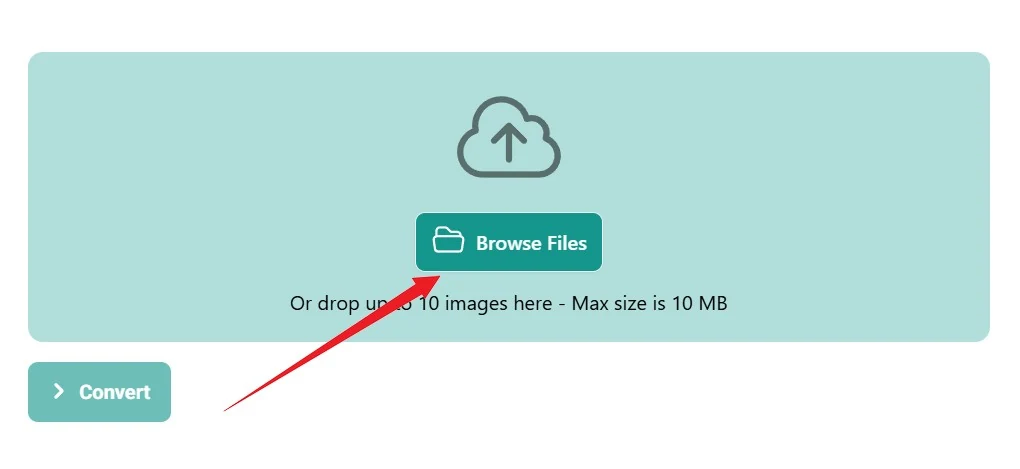
- AI Conversion Mode Selected
Auto Upload: Your image uploads automatically. Please wait for the upload and processing to complete before conversion begins.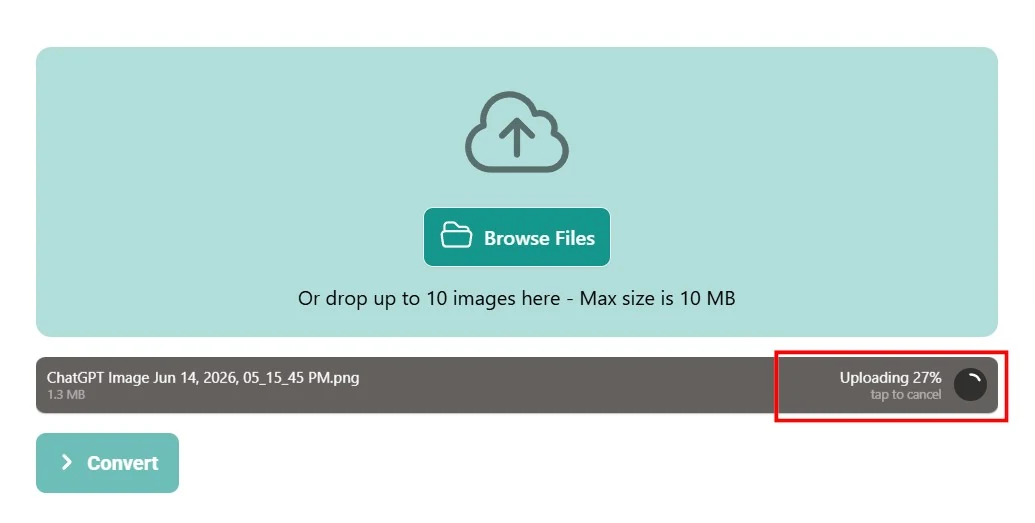
- Let the Tool Run
Process Asset: Click the convert button and let our backend software analyze your image pixels and draw smooth vector paths over them.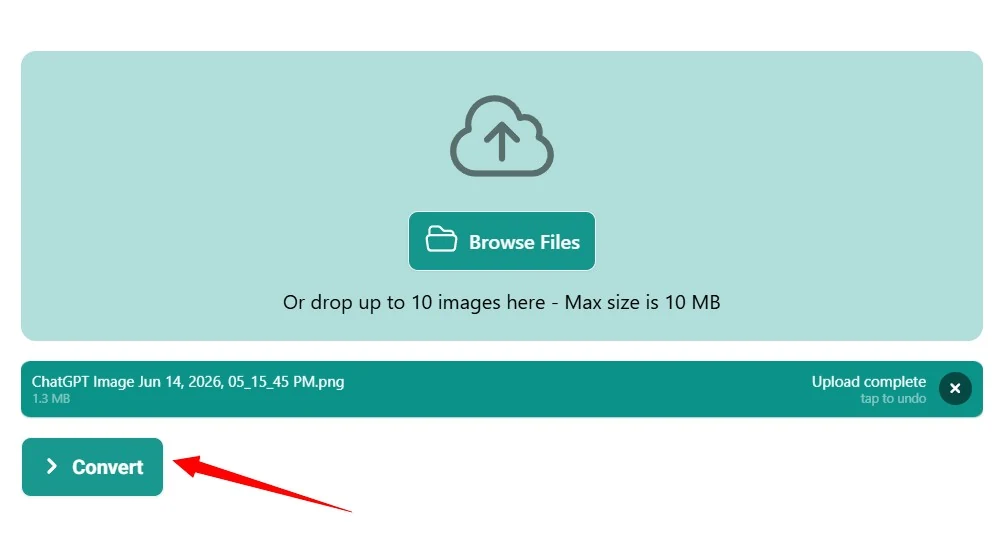
- Download Your Finished AI File
Save Design: Save the newly generated AI graphic directly to your computer or phone, ready for any professional printing project.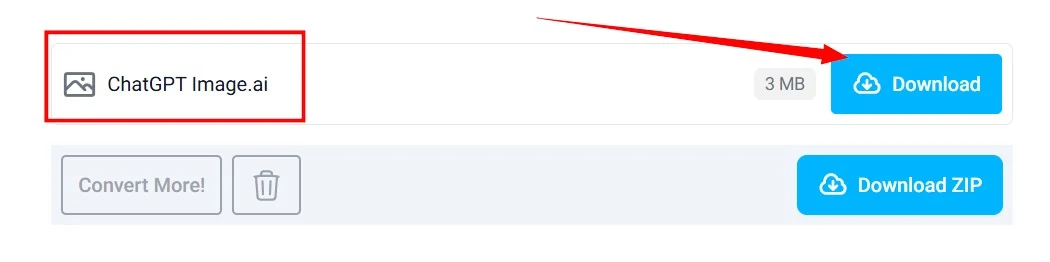
Comparing Image Formats At a Glance
Different design tasks call for different tools, and choosing the wrong file format can accidentally slow down your website or ruin your physical print job. Let us see how the AI format stacks up against everyday image files so you know exactly when to make the switch.
| File Format | Primary Visual Style | Scalability Limit | Ideal Practical Use |
|---|---|---|---|
| JPEG | Complex photography and web images | Pixels blur when enlarged | Social media posts and blog photos |
| PNG | Web graphics with transparent backgrounds | Jagged edges when stretched | Website logos and digital icons |
| AI | Clean lines, geometric shapes, and typography | Infinitely scalable with zero quality loss | Commercial printing and master brand logos |
Simple Rules for Perfect Vector Conversions
While our web converter is highly capable, the quality of your final AI file depends quite a bit on the original image you upload. Feeding a terrible, unrecognizable picture into the tool will make it harder to draw clean lines. Keep these practical tips in mind to get the cleanest possible results every single time:
- Look for Strong Contrast: Images with clear boundaries between the subject and the background always convert beautifully.
- Avoid Intense Blurs: Heavy drop shadows, glowing effects, and blurry textures do not translate well into raw vector paths.
- Use High Resolution Sources: Start with the largest version of your original image available to help the tool trace small details accurately.
- Clean Up the Layout First: Crop out unnecessary background clutter before running the conversion to save editing time later.
Final Thoughts on Smarter File Management
Taking control of your image formats is a massive step toward creating professional, beautiful work that looks great anywhere. Moving away from rigid, pixelated graphics and embracing the flexibility of scalable files saves you time, money, and creative frustration down the road. Our free conversion tool on fxroy.com bridges the gap instantly, giving you studio-grade files without the classic learning curve. Go ahead and upload your first image today to see the crisp difference for yourself.
Frequently Asked Questions
FAQ 1? What exactly does an Image to AI Converter do?
Our tool reads the color pixels in your flat image and automatically traces over them with scalable mathematical lines. This process switches your file from a limited raster format into an adjustable vector graphic that can grow to any size without becoming blurry.
FAQ 2? Can I convert a regular real-world photograph into an AI file?\
Yes, you can upload any photo to our tool. However, because photographs contain millions of tiny color shifts, the vector version will look more like a stylized painting or a cool digital illustration rather than a realistic photo.
FAQ 3? Do I need special software to open the AI file after downloading it?
To edit the vector layers, you will want a specialized design program like Adobe Illustrator or an open source alternative like Inkscape. However, if you just need to send the asset to a professional print shop, you can hand over the raw AI file directly to them.
FAQ 4? Will converting my image increase the final file size dramatically?
Actually, vector files are often much lighter than huge, high-resolution photos. Because the file only stores text-based mathematical equations instead of millions of individual pixel colors, your website will often load much faster.
FAQ 5? Is the file conversion tool on fxroy.com completely free to use?
Yes, our online conversion engine is completely free for everyone. You can upload and process your image sequences right in your browser window without paying for pricey software licenses or registering an account.